
Quick answer: Use HIPAAtizer!
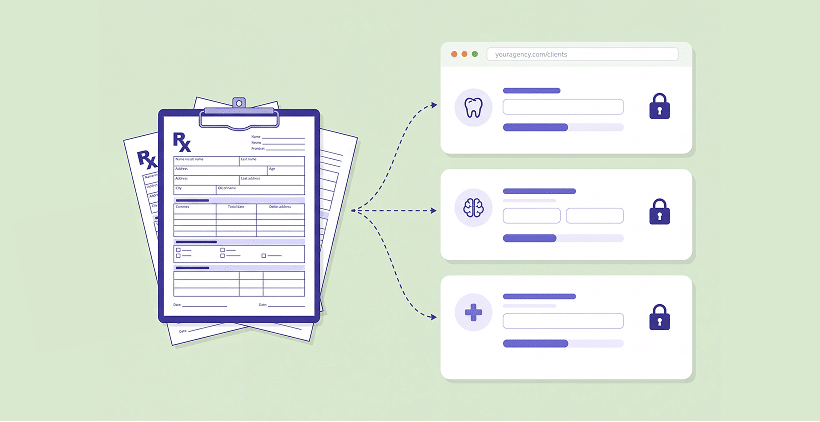
You can add HIPAA-Compliant patient forms to almost any website, whether it is built with WordPress, Wix, Webflow, Squarespace, custom code or an AI website builder. The practical approach is to collect and store patient answers in a separate HIPAA-Compliant form service that provides a Business Associate Agreement (BAA), then add the form to your website as a link or an embed. With that setup, submissions go to the form service rather than your website. And if you redesign or move your website later, you can keep the same forms and past submissions. Your wider website setup still needs to be reviewed for any other ways it might handle Protected Health Information (PHI). HHS guidance on business associates.
The Two Moments Website Forms Come Up
A new website is an exciting project. Maybe the practice wants a cleaner design, something easier to update, better hosting or lower costs. And somewhere in the conversation, the forms come up. We hear two requests especially often:
CAN WE FINALLY PUT OUR PDF FORMS ONLINE?
The practice has used the same intake packet for years. Patients print it, email it back or fill it out at the front desk. Now the team wants patients to complete those familiar forms on their phones before arriving. They usually want to keep their own questions and wording, not start over with a generic template.
CAN WE IMPROVE THE FORMS WE ALREADY HAVE?
The site may have a contact form or appointment request that was added years ago without much thought about patient information. A redesign is a good chance to review how those forms handle PHI and add anything missing, such as intake or telehealth consent.
Both requests have something in common: the website should make the forms easy to find and complete, while patient information needs to be handled appropriately behind the scenes.
Are Website Builder Forms HIPAA Compliant?
Website builders are excellent at helping teams create and update websites. Handling patient information is a different requirement. Their standard form features may not include the agreements or safeguards a healthcare practice needs. Here is a quick look at common platforms as of October 2026:
| PLATFORM | BAA FOR ITS OWN FORMS? |
|---|---|
| WordPress | No BAA for native or standard plugin forms |
| Wix | Yes, on certain plans |
| Webflow | No BAA for native forms |
| Squarespace | No BAA for native forms |
| Lovable | No BAA. See Are AI App Builders HIPAA Compliant? |
That does not mean you need to rebuild your website or stop using a platform you like. You can keep the site and add patient forms through a separate service designed for PHI.
Your Website Does Not Need to Be HIPAA Compliant. But, Your Forms Do!
Here is the distinction that makes this easier: your website can display a patient form without collecting or storing its answers itself. When a secure form is embedded or opened through a link, the information can go directly to the form provider instead of your website hosting account. This helps separate your public website from patient intake. Of course, if other parts of your website handle PHI, those still need their own review.
For practices and developers, that means:
You can use the website platform you prefer or share a form by link or QR code if you do not have a website yet.
A developer can design and place the forms without needing access to patient submissions. Whether the developer needs a BAA depends on the services they actually provide and whether they handle PHI.
You can redesign or move the website without rebuilding your forms, because the forms and submissions remain in the form service.
How to Add HIPAA-Compliant Forms to Your Website
With HIPAAtizer, you can get started without rebuilding the website. Here is the practical process:
CREATE AN ACCOUNT FOR THE PRACTICE.
Each healthcare practice has its own Covered Entity account and BAA. If you build websites for clients, you can start with a free Developer account and work with each practice separately.
BRING IN THE FORMS YOU ALREADY USE.
Upload PDF or Word forms and use HIPAAtizer’s AI converter to create an editable online version. You can also recreate forms from an existing website, add signatures or conditional questions, and group several forms into one packet. Review the converted form carefully before using it with patients.
START WITH A LINK IF YOU WANT SOMETHING SIMPLE.
Each form can be shared through a link or QR code. Add a button to the website, include the link in an email or text, or share it through your usual channels.
EMBED THE FORM IF YOU WANT IT RIGHT ON THE PAGE.
Patients can fill it out without leaving the practice website.
MAKE IT FEEL LIKE PART OF YOUR WEBSITE, THEN TEST IT.
Adjust the form’s appearance, check how it works on a phone, complete a test submission and make sure the right people receive it. Always test before going live.

NEED HELP?
Our support team can walk you through the setup. You can also use our sharing and embedding guide.
Adding Forms on WordPress, Wix, Webflow, Squarespace and Lovable
You do not have to change platforms to use HIPAAtizer. A form link or embed works across website builders, and some platforms have a dedicated HIPAAtizer integration:


You can find the full list on our integrations page.
Switching Platforms? Your Forms Move With You
A developer recently moved a healthcare client’s custom-built website to Lovable. The client already used HIPAAtizer forms, so the developer asked what would need to be migrated. The answer was pleasantly simple: just place the forms on the new website. Their questions, settings and past submissions were already in HIPAAtizer, not on the old site.
The same idea applies whether you move from Squarespace to WordPress, Wix to Webflow, or a custom website to something new. You can update the website without asking patients or staff to start over with different forms.
And what if the doctor wants to keep the original PDF?
That is a common request. The online form can be designed for easy completion on a phone, while a custom printable PDF can preserve the familiar layout staff want for the patient chart. You do not have to make patients fill out a paper-style page just to get the PDF your team needs.
Which Setup Fits You
Building a site for one clinic? Start with a free Developer account, create or convert the forms, and help the practice set up its own Covered Entity account and BAA.
Managing websites for several healthcare clients? You can work across client forms from a Developer account. If you also refer clients to HIPAAtizer, take a look at our Partnership Program.
Running your own practice? You can sign up directly, convert the forms you already have, and put them on your website or share a link or QR code if you do not have a website.
Frequently Asked Questions About HIPAA-Compliant Patient Forms For Websites
Forms that collect PHI need appropriate HIPAA safeguards. That can include appointment requests and contact forms, depending on what information they collect and how they are used. Even a name and contact details can be PHI in a healthcare context.
Working on a new healthcare website or giving an existing one a refresh?
Try converting one of the practice’s current forms with HIPAAtizer, or schedule a demo to see how it could look and work on your site.
Still have questions? Contact us