
Chiropractic Intake Form: Online and HIPAA-Compliant
Start with a ready-made chiropractic intake form, or convert your office’s existing form into a secure online version. Add it to your website, send patients a link, or put a QR code at the front desk. Patients mark where it hurts, sign at the end, and you get a clean PDF instead of a clipboard to re-type.
A Business Associate Agreement comes with every Covered Entity account.
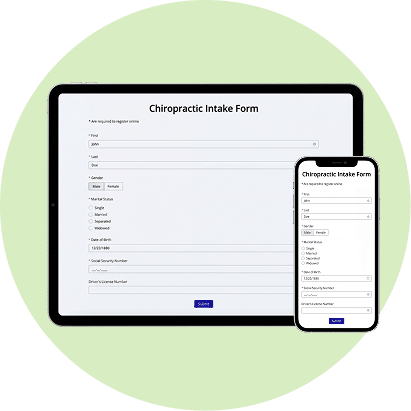
What is in the chiropractic intake form template
Our Chiropractic Intake Form Template covers what a chiropractor needs before the first adjustment. Every question can be edited, removed or moved, so treat it as a starting point for your own office.
PATIENT INFORMATION
Name, address, home and cell phone, email, date of birth, sex, marital status and employment status. If a patient picks “Other” for employment, a field appears to specify.
EMERGENCY CONTACT
Contact name, relationship to the patient and phone number.
INSURANCE AND REFERRAL
Name, address, home and cell phone, email, date of birth, sex, marital status and employment status. If a patient picks “Other” for employment, a field appears to specify.
PRIMARY COMPLAINT
If the patient has one, they describe it, when and how it began, and what makes it better or worse. These questions stay hidden for patients who answer “No.”
PAIN DIAGRAM
A body chart the patient draws on to show where the pain is.
PAIN DETAILS
Type of pain (sharp, dull ache, burning, throbbing, stabbing, shooting, numbness, tingling), whether it comes and goes or is constant, how often it occurs, where it travels, a 0 to 10 pain rating, and whether it has improved or worsened since onset.
IMPACT ON DAILY LIFE
Whether the problem keeps the patient from working, exercising, sports, driving, sleeping or family time, plus a 0 to 10 rating of overall health.
CHIROPRACTIC HISTORY
Whether the patient has been under chiropractic care before, and when.
REVIEW OF SYSTEMS
Current significant concerns grouped by system: musculoskeletal, cardiovascular, general, urinary and reproductive, nervous system, and gastrointestinal. A pregnancy question appears only when it applies.
MEDICATIONS
All current medications, including over-the-counter drugs, supplements and herbs.
ACCIDENTS, TRAUMAS AND SURGERIES
Past injuries with dates and what was injured, and any major surgeries.
PRIMARY CARE
Primary care physician, approximate date of the last visit, and any conditions treated in the last year.
CONSENT AND SIGNATURE
A statement that the answers are accurate, consent to examination, and authorization to pay insurance benefits directly to the chiropractic office, followed by an electronic signature.
Share your chiropractic intake form without changing your workflow
Patients fill out the form on their phone, tablet or computer before they arrive. Answers go to an encrypted HIPAAtizer account, not to an inbox, and you choose how patients get to the form.

EMBED TO YOUR WEBSITE
Paste the embed code into your site, or use the HIPAAtizer app or plugin for Wix, WordPress and Webflow. The form loads in an iframe, so patient answers never touch your website hosting, and your site does not need to be HIPAA-Compliant.

SEND A DIRECT LINK
Add the form link to appointment confirmations, reminder texts or your welcome email. The link contains no patient information.

GENERATE A QR CODE
Print it for the front desk or show it on a tablet. Walk-in patients scan it and complete the form on their own phone while they wait.

SHARE ON YOUR SM
Put the link in your Instagram bio, Facebook page or Google Business profile so new patients can fill out paperwork before they book. Keep conversations about symptoms out of public comments and messages.
Built for how chiropractic intake actually works
BODY CHART ON CANVAS
Upload the body diagram your office already uses. Patients draw on it with a finger or mouse to mark pain, numbness or radiating symptoms, and the drawing prints on the submission PDF next to the rest of their answers.
CONDITIONAL QUESTIONS
Follow-up questions appear only when they apply. Patients without a primary complaint skip the complaint details, and the pregnancy question shows only for patients it applies to. The form stays shorter, and you still get the details you need.
INTERNAL NOTES
Add staff-only fields for exam findings, X-ray notes, referrals or records requests. Patients never see them. Your team fills them in after the patient submits, using Edit Submission.
RETURNING PATIENTS
When a patient comes back for a new appointment, send a secure link that opens their past submission prefilled. They update what changed and sign again.
One template, three kinds of chiropractic patients
Many chiropractic offices run more than one intake. A new adult patient, a child who comes in with a parent, and someone hurt in a car accident each need slightly different paperwork. Copy the template and adjust it for each case instead of making one form that tries to cover everyone.
- Adult new patient: use the template as it is, and add your informed consent and office policies to the same packet.
- Pediatric: change the questions to fit children and add a parent or guardian consent and signature.
- Personal injury: add accident details, attorney information, an assignment of benefits and a lien notice. Shared fields such as the accident date are entered once and carried across every form in the packet.
Form packets let you send all of it in one link, so patients move through the documents in order and your front desk has fewer missing pages to chase.If you already have patients under your care and require a progress update, please refer to our re-exam template.
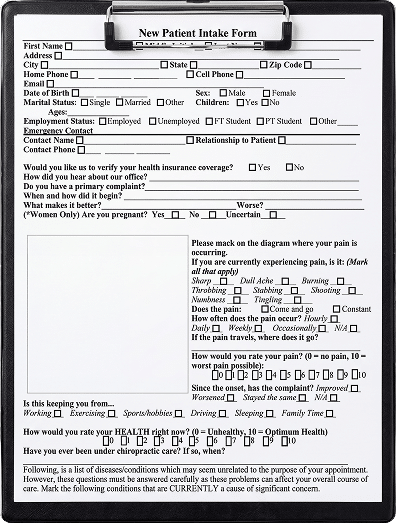
Build, Convert, and Customize Your Chiropractic Forms
USE OUR TEMPLATE AND EDIT IT
Add or remove questions, change the order, set conditional logic, mark required fields and add your logo and colors. Or start from a blank form.
SEND US THE FORM YOU ALREADY USE
Email us your PDF or Word intake, exam or consent form, and our team will rebuild it online. The first conversion is free during the 30-day trial and usually takes 2 to 5 business days.
USE AI CONVERSION
Upload your file to the AI Form Converter for a first draft in minutes, then review it and adjust the layout and questions.
Frequently Asked Questions About Chiropractic Intake Forms
Yes.
HIPAAtizer has a Chiropractic Intake Form Template you can open, test and copy into your account. It covers patient details, the primary complaint, a pain diagram, pain ratings, a review of systems, medical history and a signed consent. You can edit any part of it to match your office.