
HIPAA-Compliant Medical History Form for Your Practice
Your patients hand you their medical history on paper, or on a PDF they cannot open on a phone. Put it online instead. Upload the medical history form your practice already uses and our AI converts it into a secure online form, usually in minutes. No form yet? Start with our template and change whatever you want.
A Business Associate Agreement comes with every Covered Entity account, always.

Two ways to get your medical history form online
YOU ALREADY HAVE A FORM.
Most practices do, and it is usually a PDF or a Word file that someone in the office built years ago. Upload it. Our AI reads it and rebuilds it as a responsive online form, keeping your wording, your sections and your order. You are not starting over, and you are not asking your staff to learn a form that works differently from the one they know.
YOU ARE STARTING FROM SCRATCH.
Use our medical history template as a first draft. Then change it. Add the questions your specialty needs, delete the ones you do not use, rename a section, split it across two pages, make a field required. The template is where you begin, not what you are stuck with.
Why a fixed template is not enough
No two practices collect medical history the same way. A dental office asks about bleeding disorders and premedication. A med spa asks about previous injectables. A physiotherapy clinic asks about prior imaging and surgical hardware. A form that serves all of them serves none of them properly, and staff end up keeping a paper form alongside the online one for the questions the template does not cover.
That is the difference worth understanding before you choose a tool. Some form providers give you a library of ready-made medical history forms and that is the extent of it. HIPAAtizer gives you a form that becomes yours: every field, every section, every question type and every rule is editable, before you publish and after. The template is a convenience. The customization is the product.
What is a medical history form?
A medical history form is a document a healthcare practice gives a patient to record their past and current health information, usually before or at the start of a visit. It commonly collects current medications, allergies, chronic conditions, past surgeries and hospitalizations, family medical history, and lifestyle factors such as smoking, alcohol and exercise.
Clinicians use the form to make safe treatment decisions, identify contraindications and drug interactions, and document what the patient reported. Because it collects protected health information, a covered entity must collect, transmit and store a medical history form in a HIPAA-Compliant way. Emailing a completed form as a plain attachment, or collecting it through a standard website form builder, does not meet that standard.
A medical history form is not the same as an intake form. An intake form is the whole packet a new patient completes, which usually includes contact details, insurance, consent and privacy notices. The medical history form is the clinical section inside that packet. In HIPAAtizer you can use it on its own or drop it into a larger form packet.

What a medical history form should include
Our template covers the sections below. Treat this as a starting point and adjust it to your specialty.
PATIENT DETAILS
Name, date of birth, contact information, emergency contact, primary care provider.
CURRENT MEDICATIONS
Prescription and over-the-counter medications, dosage, supplements.
ALLERGIES AND REACTIONS
Drug, food, latex and environmental allergies, with the reaction described.
CURRENT AND PAST CONDITIONS
Chronic conditions, ongoing treatment, checkbox list of common diagnoses.
SURGICAL AND HOSPITAL HISTORY
Procedures, approximate dates, complications.
FAMILY MEDICAL HISTORY
Conditions in immediate family, which is what people mean when they search for a family medical history form.
LIFESTYLE AND SOCIAL HISTORY
Smoking, alcohol, recreational drug use, exercise, occupation where relevant.
PREGNANCY AND REPRODUCTIVE HISTORY
Where clinically relevant to the practice.
PATIENT ATTESTATION
Confirmation the information is accurate, with date and electronic signature.
You are not limited to these. Add a section, remove one, or rename them all to match the language your practice already uses.
What a medical history form should include
Our template covers the sections below. Treat this as a starting point and adjust it to your specialty.
CONDITIONAL QUESTIONS
Ask about pregnancy only when relevant. Reveal a follow-up question only when a patient checks a condition. Patients see a shorter form, you get more complete answers.
REQUIRED FIELDS AND VALIDATION
Stop forms arriving with the allergy section blank.
AUTOMATIC SCORING AND CALCULATIONS
If your history form feeds a risk score or an assessment, the form can calculate it on submission instead of your staff doing it by hand.
ELECTRONIC SIGNATURE
The patient attestation is signed on the same screen, on a phone.
FILE UPLOAD
Let patients attach an insurance card photo or a medication list from another provider.
SAVE AND CONTINUE LATER
Long history forms get abandoned. Patients can stop and come back without losing what they entered.
YOUR BRANDING
Your logo, colors and fonts, so the form does not look like it came from somewhere else.
PART OF A PACKET
Combine the medical history form with your consent, privacy notice and registration forms so a new patient completes one flow instead of five files.
Medical history update forms for returning patients
Most practices need two versions: the full history a new patient completes once, and a shorter update form an existing patient confirms at each visit. Rebuilding the long form every year is the reason so many practices give up and go back to paper.
In HIPAAtizer you duplicate your medical history form, cut it down to the questions that change, and send that one instead. Both versions live side by side, both stay HIPAA-Compliant, and the update form takes a returning patient under a minute on their phone in the waiting room.

Specialty versions
DENTAL PRACTICES
A dental health history form covers premedication, bleeding disorders, and joint replacements alongside the standard sections. If you use the ADA health history form, upload it and we will convert it as it stands. See our dental intake form page for the full dental packet.
MED SPA AND AESTHETICS
History forms here need skin type, previous treatments, and pregnancy status, and they usually sit alongside a consent form. See our med spa consent forms.
MASSAGE AND BODYWORK
A massage health history form focuses on injuries, pain areas, contraindications and pressure preferences.
TELEHEALTH
Send the history form ahead of a virtual visit as a link the patient opens on a phone, alongside your telehealth consent form.

Looking for a printable medical history form?
If a patient genuinely cannot complete a form online, print is still an option. It is worth knowing what print costs you: someone has to type the answers into your system, handwriting gets misread, the paper has to be stored securely, and you have no record of who accessed it. A completed medical history form on paper is protected health information sitting in a filing cabinet.
Practices that move the same form online stop re-typing, get legible answers, and get an audit trail of every submission and every person who opened it.
Getting your medical history form live
Step 1
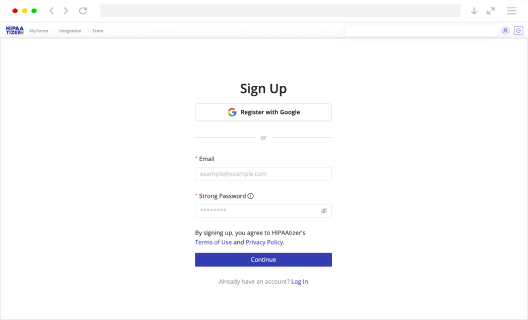
Create your account
A Business Associate Agreement comes with every Covered Entity account.
Step 2
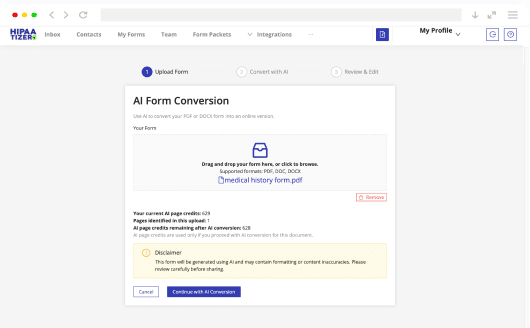
Upload your form or open the template.
Upload a PDF or Word file and our AI converts it, or start from the medical history template.
Step 3
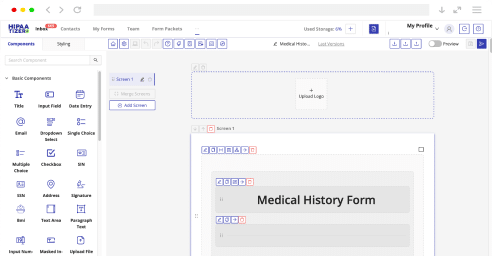
Edit it.
Add your questions, set required fields, add conditional logic, apply your branding.
Step 4
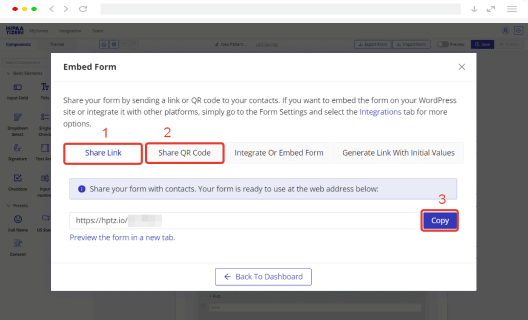
Share it.
Embed it on your website, send it as a secure link by email or text, or put it behind a QR code at reception. Works on Squarespace, WordPress, Wix, Webflow and anywhere else you can paste an embed code.
Step 5
Collect and route submissions.
Completed forms arrive encrypted, with access controls and an audit trail, and can be pushed into the tools you already use.

Frequently Asked Questions
A medical history form is a document a healthcare practice gives a patient to record their past and current health information. It typically collects current medications, allergies, chronic conditions, past surgeries and hospitalizations, family medical history and lifestyle factors. Clinicians use it to make safe treatment decisions and to document what the patient reported.