
Nutrition Intake Forms for Dietitians and Nutrition Practices
If you see clients by video, there is no waiting room and no clipboard. The intake has to reach them before the call and come back early enough that you can review it.
A diet history, a 24 hour recall, a medication and supplement list, recent labs, and a stack of consents is not efficient to gather during a 45 minute session. So you email a PDF and hope it comes back, or you use an online form built for mailing list signups. The PDF gets printed, scanned, or returned as an attachment carrying your client’s medical history.
HIPAAtizer does not change that workflow. You still send a link before the visit. The difference is that this one is HIPAA-Compliant, and the answers come back to an encrypted vault instead of your inbox. And if you have a website, add the form to it. New clients can complete it when they book, so it is done before the visit without you sending anything at all.
Why your website’s built-in form will not do
Whatever your practice website is built with, its built-in form tool is probably not a good place to collect the information you need for an assessment.
The moment a client tells you their weight, their A1C, about their reflux, their eating patterns, or the name of the physician who referred them, you are collecting and potentially storing Protected Health Information.
HIPAA asks two things of you at that point: that the data is stored , and that whoever holds it for you has signed a Business Associate Agreement. A standard website form builder does neither. The submission usually lands in an email inbox and a dashboard that were never built to hold PHI, and the vendor will not sign a BAA for it.
You do not have to move your website or rebuild it to fix this. When you embed a HIPAAtizer form, it loads inside your page in an iframe and the answers are transmitted straight to HIPAAtizer’s HIPAA-Compliant cloud. Nothing passes through your own hosting, so your website does not need to be HIPAA Compliant, regardless of whoever hosts it. HIPAAtizer signs the BAA with your practice as the covered entity, and the forms you publish are compliant from the first day of your free trial.
Add your form to any website
Every HIPAAtizer form comes with a JavaScript snippet and an iFrame embed code, which is all you need to maintain HIPAA Compliance on any website. Some platforms make it even quicker:

WIX
There is a HIPAAtizer app in the Wix App Market. Install it, pick your form, and drop it on the page. No code. Immediately HIPAA Compliant.

Squarespace
Paste the embed code into a Code block on any page. Our Squarespace page walks through it step by step.



And if you have no website yet, or you would rather not touch the one you have, you do not need to. Skip embedding entirely and use the form’s own link, covered next. Plenty of nutrition practices run their whole intake that way.
Share your form by link, QR code, or social media
No website required. Every form has its own short link, a QR code, and a form link that doesn’t carry any PHI on its own. Only the answers a client types are protected, and those go straight to the HIPAAtizer HIPAA-Compliant vault in your account. So the link itself is safe to send anywhere, including a public post.
That means you can:
- Print the QR code on a business card, a clinic flyer, or the back of a handout
- Put your intake form in your Instagram link in bio, or in a link-in-bio menu next to your booking page
- Post the link in a Facebook page button, a group post, or a story sticker
- Add it to a TikTok or LinkedIn profile, or a Google Business Profile
- Send it in a DM, a text message, or a plain email when someone asks how to start working with you
- Include it in your newsletter or an appointment confirmation

Form links stay the same even after you edit the form, so a link you posted in March still works after you rewrite your questions in September. You never have to go back and fix your bio.
One reminder: keep the conversation itself off social media. A client can follow a public link to your form and answer sensitive questions inside it, but you should not be discussing symptoms, weight, or diagnoses in Instagram DMs or Facebook comments. The link is the handoff from the public channel into a private, HIPAA-Compliant one.
What belongs on a nutrition intake form
This is where a general purpose patient intake form stops being useful. Dietitians need a different set of questions, and they need them in an order that a client will actually finish. A typical nutrition intake form in HIPAAtizer runs across a few screens:
CLIENT AND REFERRAL
Name, date of birth, contact details, preferred pronouns if you ask for them, referral source, and the referring physician. If you bill medical nutrition therapy, this screen is also where the referral date and diagnosis code go.
REASON FOR VISIT AND GOALS
What brought them to you, what they want to change, what they have already tried, and how ready they feel to change it. Ask this in their words, not yours.
DIET HISTORY
A typical day of eating, meal timing, snacking patterns, eating out, who shops and who cooks, food budget, and cultural or religious food practices. Add a 24 hour recall or a three day food record as its own screen when you want detail.
MEDICAL AND GI HISTORY
Current conditions, past surgeries including bariatric procedures, GI symptoms, bowel habits, and menstrual or pregnancy history where it is relevant. Use conditional logic here so a client only sees the follow-up questions that apply to them.
MEDICATIONS AND SUPPLEMENTS
A repeatable table works better than a text box. The client adds a row per item with name, dose, and frequency, and you get a clean list instead of a paragraph.
ALLERGIES AND INTOLERANCES
Diagnosed food allergies, suspected intolerances, and foods they avoid for any other reason.
ANTHROPOMETRICS AND LABS
Height, current weight, weight history, and goal weight if you use it. Add a file upload field so clients can attach a recent lab report or a copy of their referral instead of reading numbers into a text field.
ACTIVITY, SLEEP, ALCOHOL AND CAFFEINE
Short section, but it changes your plan.
INSURANCE AND PAYMENT
Payer, member ID, and a card upload if you verify coverage before the first session. You can also take a deposit or a session payment on the form itself through Stripe or PayPal.
CONSENT AND SIGNATURES
Informed consent for nutrition counseling, your cancellation and no-show policy, telehealth consent if you see clients by video, acknowledgment of your Notice of Privacy Practices, and a photo or testimonial release if you ask for one. Each of these can be a separate signature on the same form, or separate forms bundled into one form packet the client works through in a single sitting.
Start from a template, then make it yours
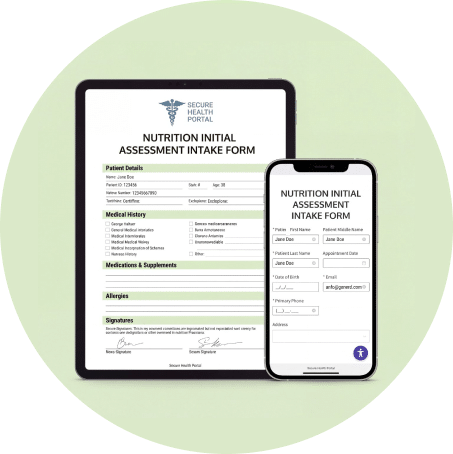
Templates are how you get started, not what you end up with. The Nutrition Initial Assessment Intake Form in our template library is a working starting point, and you are meant to take it apart.
The practices that get real value out of HIPAAtizer are the ones running a form built around how they actually work: the screening questions specific to their niche, their intake order, their consent language, their branding, their required fields. A dietitian who specializes in GI conditions asks almost nothing that a sports dietitian asks. A prenatal practice needs a pregnancy screen that a weight management practice does not. Editing a generic template until it fits is not extra work, it is the whole point.
Three ways to get there:
Use our template and edit it
Drag and drop additional fields, split rows into columns, add screens, set conditional logic, mark fields required. You can also start from a blank form if you would rather build the whole thing yourself.
Send us the form you already use
Email your PDF or Word intake and our team rebuilds it as a HIPAAtizer form. The first conversion is free during your 30 day trial. Turnaround is usually two to five business days, and it is much faster when the file is a digital PDF rather than a scan of a paper form.
Use AI conversion
Upload the file and let AI form conversion do the first pass, then refine it yourself.
What you get with HIPAAtizer
A BAA WITH YOUR PRACTICE
Signed with you as the covered entity, and in place during the free trial.
SUBMISSIONS IN ONE PLACE
Every completed form appears in your dashboard where you can read it, download it as PDF or CSV, and search it.
EMAIL NOTIFICATION WITH A PDF COPY
Password-protected and encrypted, so the copy in your email is safe.
A PRINTABLE PDF THAT MATCHES YOUR PAPER FORM
Keep your existing layout for the chart, or generate a clean table of the answers, or print the form as it looks on the web.
MOBILE-FRIENDLY BY DEFAULT
Most clients will fill this out on a phone, and long intake forms are where that matters most.
YOUR BRANDING
Logo, fonts, and colors to match your site, so the form does not look like it came from somewhere else.
TEAM ACCESS YOU CONTROL
Invite an assistant or an associate RD and decide which forms and submissions each of them can see.
BUILT-IN SIGNATURE FIELDS
Clients draw or type a signature on the form. No separate signing step, no printing.
FORM PACKETS
Bundle intake, consent, and policy forms into one link a client completes in a single sitting.
REPEAT CLIENTS RECOGNIZED
Submissions from the same email address attach to the same client record, so a follow-up form sits next to the original intake.
INTEGRATIONS
Push non-PHI details to your CRM or scheduler through a webhook, and keep the PHI in HIPAAtizer.
Frequently Asked Questions
Yes. Start with our Nutrition Initial Assessment Intake Form, build your own from scratch, or send us the intake you already use and we will convert it. Most practices start from the template and then rewrite it around their own specialty and consent language, which is what it is there for.