

Return to Patient for Edits
You can send an existing form or form packet submission back to the patient so they can make corrections or updates.
This is useful when information is missing, incorrect, or needs to be confirmed by the patient.
Send a submission back for edits
- Open the submission from your Inbox.
- Click Return to Patient for Edits.

- Enter the patient's email address.
OR
- (Optional) Generate a QR code to present directly to the patient.
- Confirm the action.
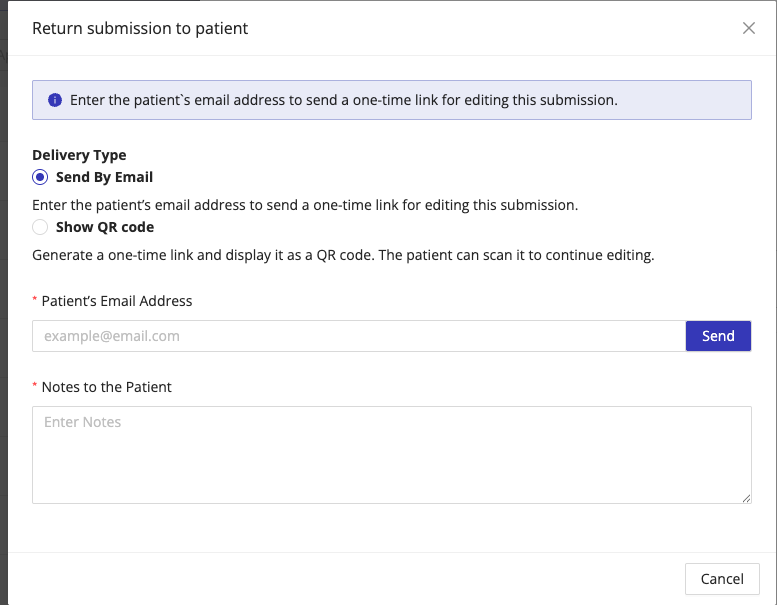
HIPAAtizer will send the patient a secure, one-time link. The link opens the original form prefilled with the existing submission data, allowing the patient to review and edit their responses before submitting it again.
What the patient sees
- The form opens with all previously submitted values prefilled
- The patient can update fields as needed
- Once submitted, the updated submission is sent back to your inbox
Cancel or revoke access
You can cancel the return request at any time by clicking the Cancel Return to Patient icon on the submission.

When you cancel:
- The active one-time link is immediately deactivated
- The patient will no longer be able to access the form using that link
One-time link behavior
Return-to-patient links follow these rules:
- Links expire after 7 days.
- Links are single-use for submission
- Once the form is saved or submitted, the link becomes invalid
- If the link is opened but the form is not saved or submitted, the link remains valid and can be used later
- Generating a new link or clicking Cancel Return to Patient immediately invalidates all previously issued links
Notes and best practices
- Always verify the patient's email address before sending the link
- Use QR codes for in-person workflows or kiosk-based scenarios
- Cancel unused links if the correction is no longer needed