

SEO Form Settings
The SEO Form Settings tab allows you to configure meta-information and visual assets for the public version of your form. These settings help improve how your form appears in search engines and when shared via social media or messaging apps.
This is especially useful if you:
- Redirect users to the form's public URL instead of embedding it on your website.
- Share the form's short link directly through messengers or email campaigns.
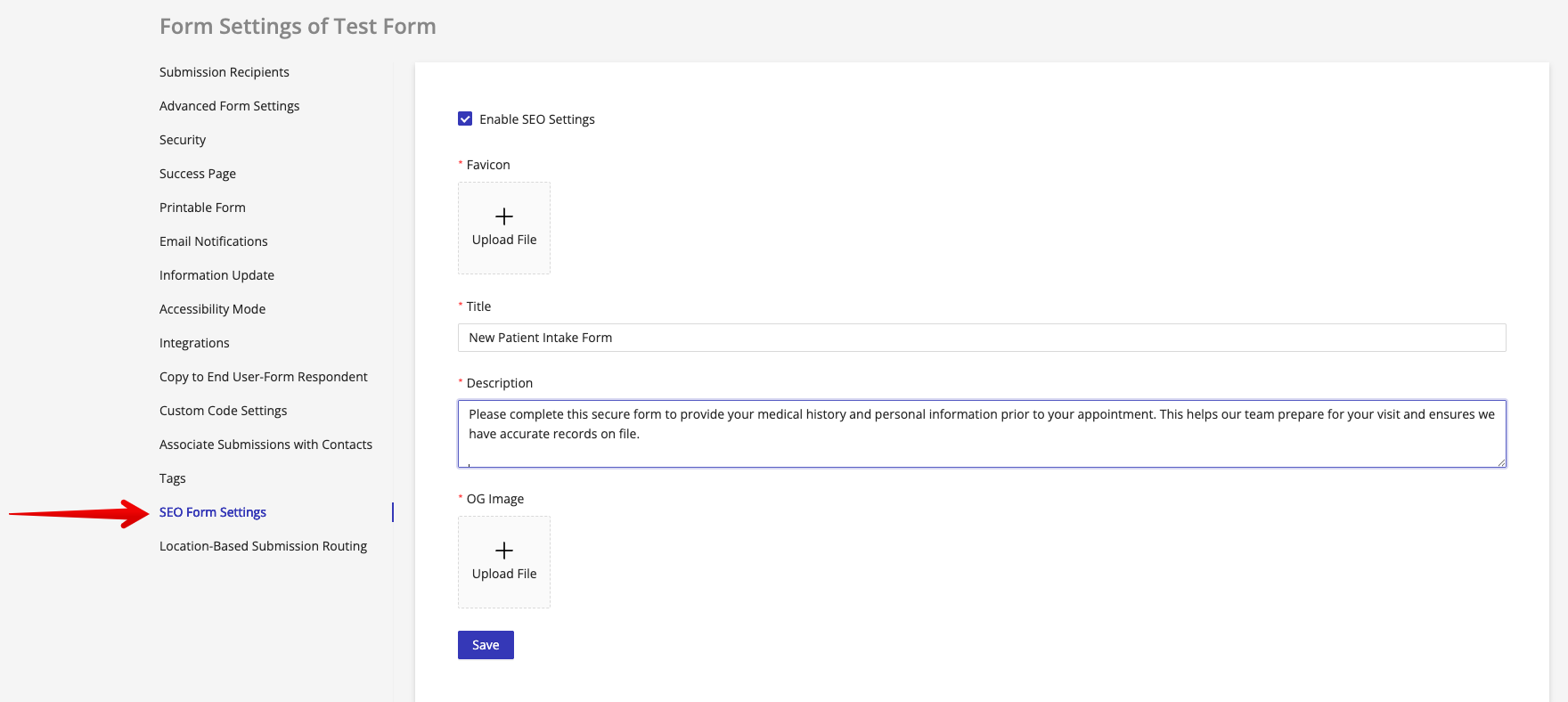
Available SEO Settings
In this section, you can configure:
-
Meta Title The title tag that appears in browser tabs and search engine results.
-
Meta Description A brief description displayed in search engine results below the title.
-
Favicon The small icon shown in browser tabs, bookmarks, and some search results.
-
OG Image (Open Graph Image) The image displayed when the form's public link is shared on social platforms or messengers like Facebook, WhatsApp, or Telegram.
Important Notes
Different messaging apps and devices may render link previews differently. We strongly recommend testing your SEO Form Settings before sharing the public link with patients to ensure it appears as expected.
Why Configure SEO Settings?
If you're not embedding the form on your website, setting these values ensures:
- A professional appearance in search results.
- Branded and attractive previews when links are shared.
- Better user trust and engagement when opening links from messaging apps.