

How to Share Forms from a Developer Account to a Covered Entity Account
While forms can be created in both Developer and Covered Entity accounts, only forms created in Covered Entity accounts are HIPAA Compliant, and only Covered Entity accounts can activate and publish them. Please follow the instructions below to learn how to share forms from a Developer account to a Covered Entity account.
Sharing Forms
If you want to share a form with an existing HIPAAtizer Covered Entity, make sure that they add you as a Team Member.
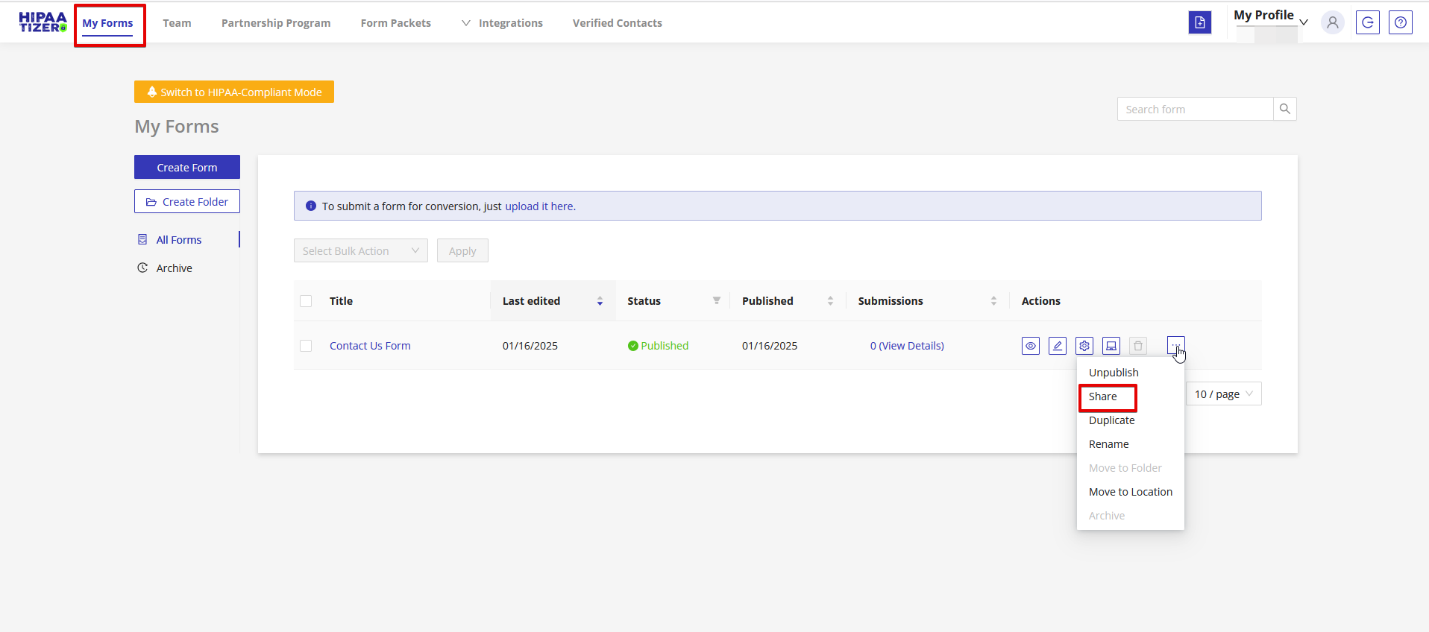
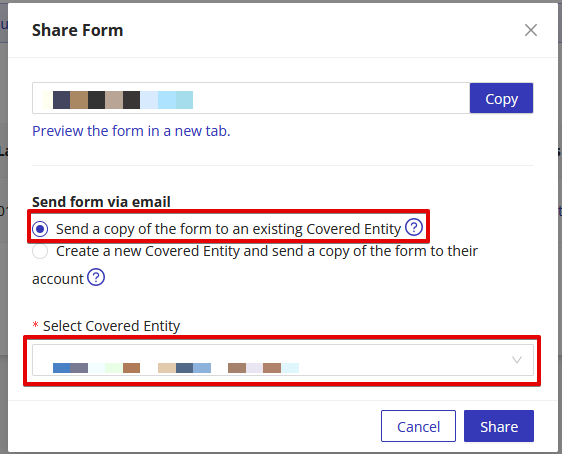
Click 'My Forms' in the dashboard and then hover over the ellipsis icon (…) beside the form you wish to share. Click 'share' from the dropdown menu. Choose 'Send a copy of the form to an existing Covered Entity', then select a Covered Entity from the dropdown box and click 'Share'.
Converting a Developer Account
It is also possible to convert an existing Developer account into a Covered Entity account. To learn more, visit our instructions on Switching Your HIPAAtizer Account From a Developer Account to a Covered Entity Account.