
Add HIPAA-Compliant Online Forms to Your Base44 App
Keep the app you built on Base44. Add HIPAA-Compliant forms to your Base44 app and style them to match your design. No rebuild, no separate backend: share a link or add one embed, and patient data goes straight to HIPAAtizer.

Is Base44 HIPAA Compliant? How to Use It With HIPAAtizer
Base44 is a fast way to turn an idea into a working app, with the database, login and hosting already built in. But if your app needs to collect patient information, there is one important detail: Base44 does not currently offer a Business Associate Agreement (BAA), and its terms allow Protected Health Information (PHI) only if Base44 agrees to it in writing in advance. You don’t have to rebuild your Base44 app. Instead, simply add HIPAAtizer forms to it. Patients complete the form, and their PHI is collected and stored in HIPAAtizer’s HIPAA-Compliant environment rather than in Base44. For more information see our recent blog post.
With HIPAAtizer Forms on Your Base44 App, You Can:
COLLECT PATIENT INFORMATION
Use HIPAAtizer for intake forms, medical history, insurance information, consents, and other forms that collect PHI.
SAVE AND EXPORT SUBMISSIONS YOUR WAY
Receive encrypted PDFs by email, or export submission data to Excel or Google Sheets.
MATCH YOUR BASE44 DESIGN
Customize colors, fonts, layout, and your logo so your forms feel like part of your app.
SEND FORM PACKETS AND BUILD WORKFLOWS
Group multiple forms into a packet and automate what happens after a patient submits them.
CONVERT YOUR EXISTING FORMS WITH
AI Already have a PDF, Word, or web form? Upload it in HIPAAtizer and use the AI Form Converter to turn it into an online form.
How to Add a HIPAA Form to a Base44 App
Step 1
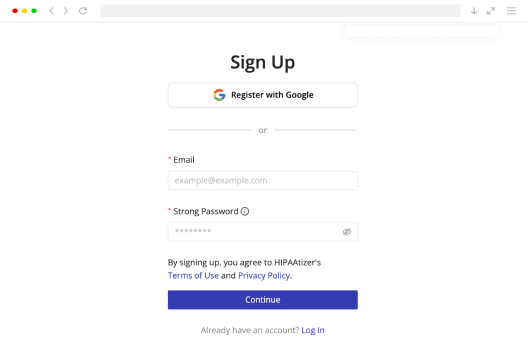
Sign up
Sign up. Create a Covered Entity account if you’re building for your own healthcare organization, or a free Developer account if you’re building for a client. A BAA is included with every Covered Entity account.
Step 2
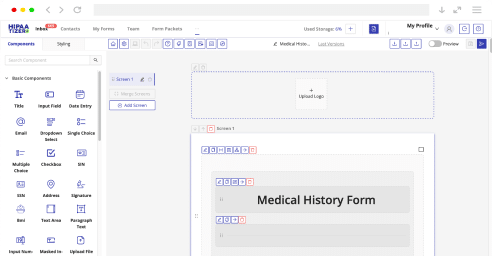
Create your form
Already have a form? Upload your PDF, Word, or web form and convert it with HIPAAtizer AI. Or start with one of our templates. You can customize the result using the Form Builder.
Step 3
Add it to Base44
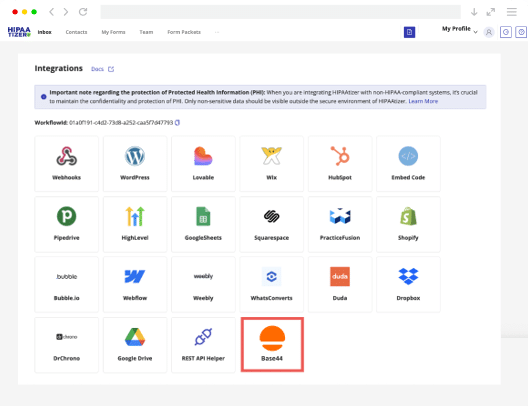
The simplest option is to add the form link to a button in your Base44 app. You can also share the same form by email or QR code. No code needed.
Want the form directly inside your app? If your Base44 app allows a custom HTML or embed block, you can add your HIPAAtizer form using the JavaScript embed code or an iFrame. Copy the embed code for your form in HIPAAtizer and paste it into that block.
Because the form loads in an iFrame, all PHI goes directly to HIPAAtizer’s HIPAA-Compliant environment and never touches Base44’s infrastructure.
Need a hand? Our support team will help you set it up, or book a demo and we’ll walk through the setup with your app.

Keep Patient Data in HIPAAtizer
When patients complete a HIPAAtizer form, their PHI stays in HIPAAtizer rather than Base44. That means you don’t need a BAA with Base44 for the form data. To keep it that way, don’t pull submissions back into your Base44 database or store health details in Base44 fields. Your app can still show that a form was completed; the answers stay in HIPAAtizer.
Moving From Another App Builder to Base44?
Nothing to Migrate
Your forms, settings and submissions live in your HIPAAtizer account, not in your app. Add the same forms to your new Base44 app and everything keeps working.

Keep Your Base44 App. Add HIPAA-Compliant Forms.
Start with the app you’ve already built. Add HIPAAtizer when you need to collect patient information securely. See our full list of integrations.
Frequently Asked Questions
Not by itself. As of October 2026, Base44 does not offer a BAA. With HIPAAtizer forms, PHI can be collected and stored in HIPAAtizer’s HIPAA-Compliant environment under a BAA instead of being stored in Base44.