
The paper form that worked for decades
Before the internet, patient intake forms were simple. A clipboard, a pen, a few pages asking about your medical history, symptoms, medications, and insurance.
These paper forms worked because the whole workflow was self-contained. The patient filled them out in the waiting room. The doctor reviewed them in the exam room, often scribbling in the margins. Afterward, the forms went into a file cabinet in a locked records room. Access was restricted. The chain of custody was obvious. Privacy was built into the physical process.
Even after most practices set up websites and adopted electronic medical records, the paper intake form survived. Doctors had spent years customizing their forms. They knew where to find the medication list, where the allergy section was, which checkbox meant a red flag. These weren’t just data collection sheets. They were clinical instruments, tuned to how each provider actually reads and processes information during a 15-minute appointment.
That’s why you’ll still hear physicians say some version of “I want my form, not a template.” A generic digital form loses the clinical shorthand that makes a paper form useful when you have fifteen minutes with a patient.
Then COVID hit
The pandemic in 2020 forced healthcare to rethink nearly every in-person process, patient intake included.
Nobody knew exactly how the virus spread in the early months. The CDC’s infection control guidance for healthcare settings recommended minimizing shared objects, increasing cleaning protocols, and reducing unnecessary in-person contact. While the CDC later determined that surface (fomite) transmission of SARS-CoV-2 was relatively low-risk compared to respiratory spread, the uncertainty drove action. Healthcare facilities were told to limit items brought into patient care areas and cut down face-to-face interactions where possible.
Clinics responded by asking patients to complete forms before arriving. Some emailed PDFs. Some texted links to Google Forms. Some threw together basic web forms on their existing websites. The point was to get people through the waiting room faster and reduce physical contact.
It worked in one sense: forms got digitized. But it didn’t work in another. Most of these quick fixes were not HIPAA Compliant.
Going digital opens up significant HIPAA-related risks
HIPAA requires that any tool collecting, transmitting, or storing protected health information (PHI) meets specific security standards. A form asking for a patient’s name, date of birth, medical conditions, or insurance ID is collecting PHI. The tool handling that data needs to encrypt it in transit and at rest, operate under a signed Business Associate Agreement (BAA) with the healthcare provider, restrict access to authorized personnel, log who views what and when, and store everything on compliant infrastructure.
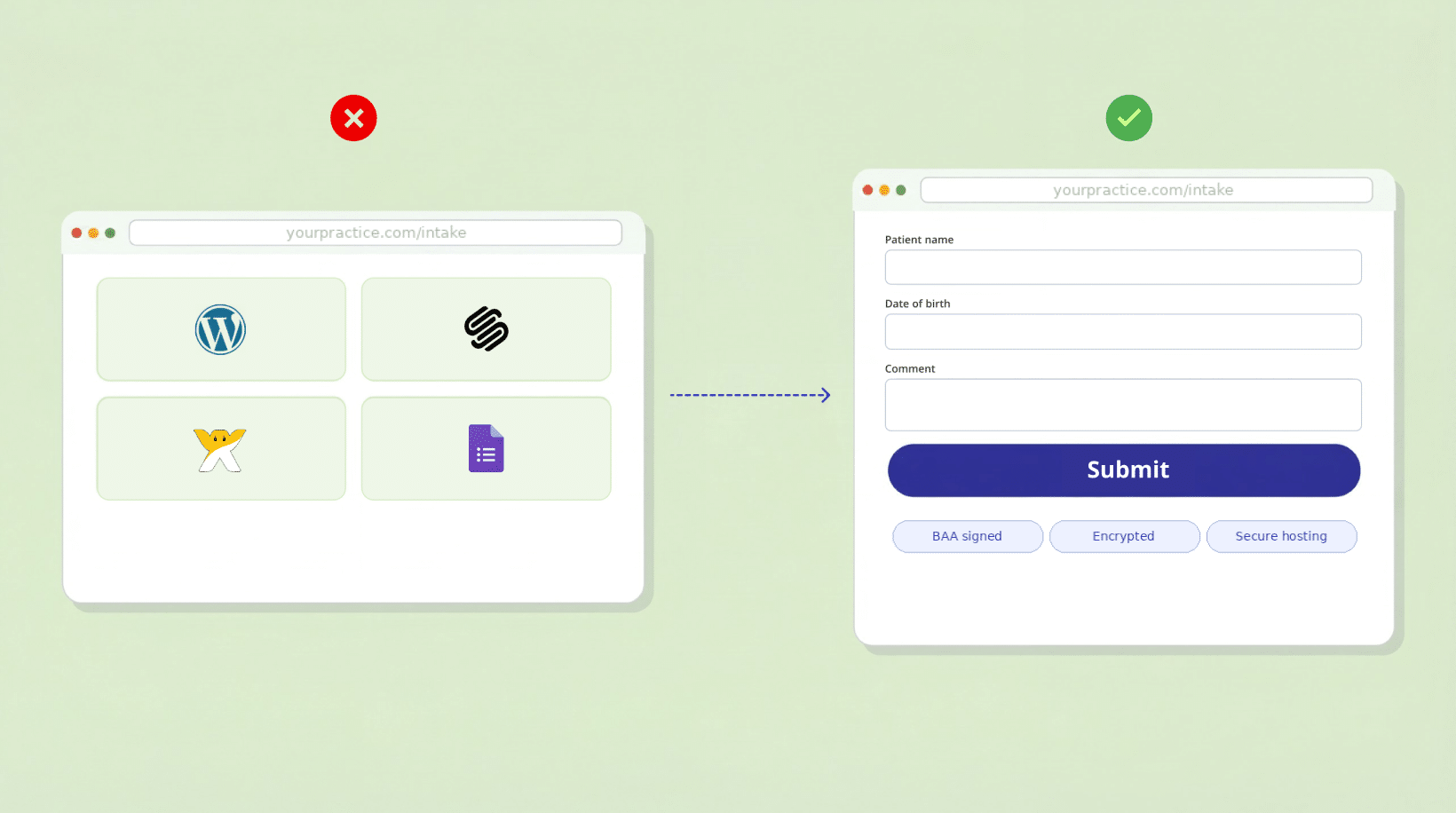
A basic contact form on a Squarespace, Wix, or WordPress website does none of this by default. Neither does a Google Form or a PDF emailed as an attachment.
The website builder problem
This is where most small practices get stuck. They already have a website on Squarespace, WordPress, or Wix. They want to add a patient intake form. The platform’s built-in forms are right there, easy to set up.
But none of these platforms offer HIPAA-Compliant forms out of the box.
Squarespace does not sign a BAA and should not be used to collect PHI through its native forms. In 2026, Squarespace partnered with Acuity for HIPAA-Compliant scheduling, but that’s a separate $49/month plan and only covers scheduling, not general intake forms.
Wix recently started offering a BAA on certain plans, which is progress. But actually making Wix forms HIPAA Compliant requires a specific configuration, and features like conditional logic, secure file uploads, and controlled submission access aren’t part of the standard form tools.
WordPress is technically capable of HIPAA Compliance, but only with the right hosting, security plugins, and configuration. Most WordPress sites aren’t set up that way. Standard form plugins like Contact Form 7, WPForms, or Gravity Forms do not provide HIPAA Compliance on their own.
Google Forms is not HIPAA Compliant. Google Workspace can be configured with a BAA under certain enterprise plans, but the free version of Google Forms that most people use, does not qualify.
So practices end up in an awkward spot. The tools they have aren’t compliant. The alternatives are often expensive, complicated, or both.
The cost problem for small practices
HIPAA Compliance isn’t only a form issue. Initial compliance setup for a small practice can run from $5,000 to $30,000, and ongoing costs keep adding up. In 2022, small medical and dental practices accounted for 55% of the Office for Civil Rights (OCR) financial penalties for HIPAA violations.
If you’re a two-physician practice or a solo therapist, spending thousands on compliance infrastructure feels completely out of proportion. Especially when the actual thing you need, a secure intake form, seems like it should be simple.
That mismatch between cost and complexity is one of the biggest reasons website forms stay non-compliant. Practices know they need to fix it. The path to fixing it feels like it requires enterprise-level effort for what is, at its root, a small-practice problem.
The EMR gap
There’s another factor: electronic medical records.
Many small practices adopted their EMR years ago. Some of these systems are legacy products that aren’t cloud based, aren’t mobile friendly, and were never designed for patient-facing digital intake. They handle charting and billing fine, but they don’t extend to the patient’s experience on a website.
Some modern EMRs do offer patient portals with intake forms. But the portals often have clunky interfaces, require patients to create accounts (which many won’t bother with for a first visit), and don’t connect smoothly with the practice’s website. The “I want my form” problem comes back: the EMR’s built-in forms are generic templates that don’t match the provider’s clinical workflow.
So you end up with a website that has no compliant forms, an EMR portal nobody uses, and a stack of paper forms in the waiting room that still, barely, gets the job done.
What makes a web form HIPAA Compliant?
A HIPAA-Compliant web form needs a few specific things.
First, a Business Associate Agreement (BAA). The form provider must sign a BAA with your practice. No BAA means any use of a third-party tool to collect PHI is a HIPAA violation, even if the tool itself is secure.
Second, encryption. Data has to be encrypted in transit (TLS/SSL) and at rest (AES-256 or equivalent).
Third, access controls. Only authorized staff should see form submissions. That means role-based access, not a shared inbox where anyone can read patient data.
Fourth, audit logging. The system needs to track who accessed what data and when.
Fifth, secure hosting. Form data should be stored on infrastructure meeting HIPAA technical safeguards, typically SOC 2 compliant data centers.
And finally, data retention and disposal policies. There need to be clear rules for how long data is kept and how it’s securely deleted.
Third-party HIPAA-Compliant form tools like HIPAAtizer, Jotform (HIPAA plan), and IntakeQ are built to meet these requirements. They can be embedded into any existing website regardless of platform, so a practice doesn’t need to rebuild their site or switch away from Squarespace, WordPress, or Wix.
Why most web forms are non-compliant
When you add it all up, the reasons come down to a few things happening at once.
Paper forms worked for decades. The shift to digital was reactive, mostly pushed by COVID, and the quick solutions practices grabbed weren’t built for compliance.
The website builders most small practices use don’t support HIPAA-Compliant data collection natively.
Practices overestimate the cost and complexity of adding compliant forms, partly because the broader HIPAA Compliance world is, in fact, expensive and complicated.
Doctors spent years refining their intake forms and don’t want to switch to templates that don’t match how they work.
And legacy EMRs don’t bridge the gap between the practice website and the clinical system.
None of these are excuses. PHI protection is a legal requirement. But they explain why there’s a gap between what should be happening and what actually is.
What small practices can do right now
You don’t need to leave Squarespace, WordPress, or Wix. HIPAA-Compliant form tools like HIPAAtizer can be embedded on any site. The form handles encryption, the BAA, hosting, and access controls. Your website stays the same.
You can also keep your own form design. Good HIPAA-Compliant form builders let you customize the form to match your intake workflow. Replicate your paper form’s structure, keep the sections and questions your providers depend on, and still collect data securely.
You don’t have to digitize everything at once. Start with one form: the new patient intake. Once that works, add consent forms, medical history updates, or pre-visit questionnaires.
And if you’re already collecting any health information through your website’s contact form, check what data those forms actually capture. If a patient can enter their name and a health concern in the same submission, that’s PHI, and you may already be out of compliance.
The bottom line
Patients pick a doctor because the doctor is good, not because the forms are fancy. But HIPAA-Compliant intake forms aren’t about being fancy. They protect patient information during a process that’s rapidly moving online, whether practices planned for it or not.
Many practices are somewhere in the middle of this transition. A website here, paper forms there, an EMR doing its own thing. The forms are a small piece of healthcare, but they carry real legal and privacy obligations.
Making your website forms HIPAA-Compliant is cheaper and easier than it was a few years ago. The tools exist. Learn more How to add a HIPAA-Compliant online form to any website with HIPAAtizer.
Frequently Asked Questions
No. Squarespace does not sign a Business Associate Agreement (BAA) for its native form tools and should not be used to collect protected health information (PHI). Practices on Squarespace can embed a third-party HIPAA-Compliant form builder like HIPAAtizer to collect patient data securely.
Still have questions? Contact us