

How to Submit Form Change Requests
HIPAAtizer provides a free service to edit and update your existing forms. To help us process your request quickly and accurately, please follow the guidelines below.
Preparing Your Request
Before submitting a request, create a list of the fields or components you would like us to edit, add, or remove. Please include the following details:
- Form name
- Screen(s)/page(s) of the form that need changes
- Detailed descriptions of the edits required
- For more complex requests, attach a version of your current form (e.g., a printable template) with the changes clearly marked
For simple edits, you can describe the changes directly in your help ticket. For more extensive updates (more than 5 total changes), please attach the current form version and highlight the requested edits (e.g., using yellow highlights) with a clear explanation of what should be changed.
Submitting Your Request
Option 1: Submit by Email
Send your change request to support@hipaatizer.com. Be sure to include all relevant details and attach supporting documents if applicable.
Option 2: Submit Through the Dashboard
-
Click the Help button (question mark
?) in the top-right corner of your HIPAAtizer dashboard. -
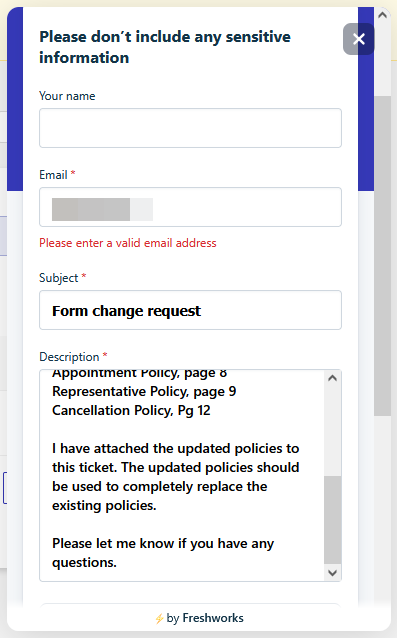
A modal window will open requesting:
- Your email
- Subject of the request
- Description of the changes
- Attachments (if any)

-
Use the provided fields and attachments to clearly outline your request.

-
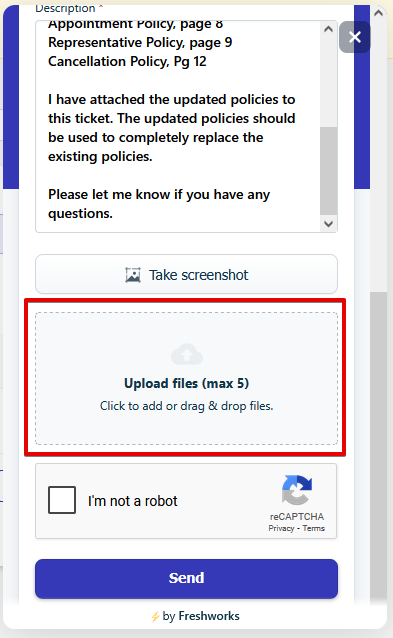
Don't forget to upload any supporting files (e.g., annotated versions of your forms).
-
Once complete, click Send. You'll receive a notification once the changes have been made.
Important Notes
- Each form has its own request and change log. If you have multiple forms, submit separate requests for each one.
- Any changes made to your online form will not automatically apply to its printable template. To update a printable form template, please send a separate request to support@hipaatizer.com.