

Add a HIPAAtizer Form to a Shopify Product Page
You can collect PHI directly on a Shopify product page when a customer must provide prescription information before adding a product to the cart.
In this guide, you will embed an existing HIPAAtizer form on a Shopify product page and automatically submit it when the customer clicks Add to cart. If any required fields in the HIPAAtizer form are missing, the form will display validation errors and Shopify will block the add-to-cart action until the form is valid.
This guide is written for the Dawn theme.
If you are using a different Shopify theme, file names and JavaScript entry points may differ. You may need to:
- Modify a different template or JavaScript file
- Adjust selectors used for the Add to cart logic
What this setup does
- Embeds a HIPAAtizer form (iframe) on a Shopify product page
- Intercepts the Add to cart action
- Sends a
Submitcommand to the embedded form through the form'spostMessageAPI - Waits for the
AllFormsSubmittedevent, which carries thesubmissionURL - Stores the submission URL in Shopify cart attributes under
HIPAA URL - Continues with the normal Shopify add-to-cart flow once the form is valid
Prerequisites
- A published HIPAAtizer form embedded on the product page as an iframe
- Access to Shopify theme code
- The Workflow ID (Form ID) of your HIPAAtizer form (available in Form Settings → Integrations in the HIPAAtizer dashboard)
- The
postMessageAPI enabled for that form, in Form Settings → Advanced Form Settings → postMessage API:- Turn the API on
- Under commands, allow Submit
- Under events, allow Submission complete
- Add your storefront origin to the allowed origins list
- The form's own origin, which the code below needs as
FORM_ORIGIN
The allowed origins list accepts up to three entries, and each one is matched exactly on scheme, host and port.
https://your-shop.myshopify.com and your custom storefront domain are two separate entries, and a preview domain is a third. If the page sending the command is not on an allowed origin, the form ignores the command and sends nothing back, so your code will wait until it times out.
The postMessage API section also contains a Code for your page block that generates a ready-made snippet for the origins, commands and events you selected, with FORM_ORIGIN and the iframe ID already filled in.
Copy FORM_ORIGIN from there instead of typing a domain by hand. It differs between form versions and white-label setups.
This flow needs no field values, so leave the exposed fields list empty.
Every field you expose there is sent to the storefront page inside the Submit response and the AllFormsSubmitted event, which places PHI into the Shopify page context.
Step 1: Hide the Submit button in the HIPAAtizer Form Builder
- Open your form in the HIPAAtizer Form Builder
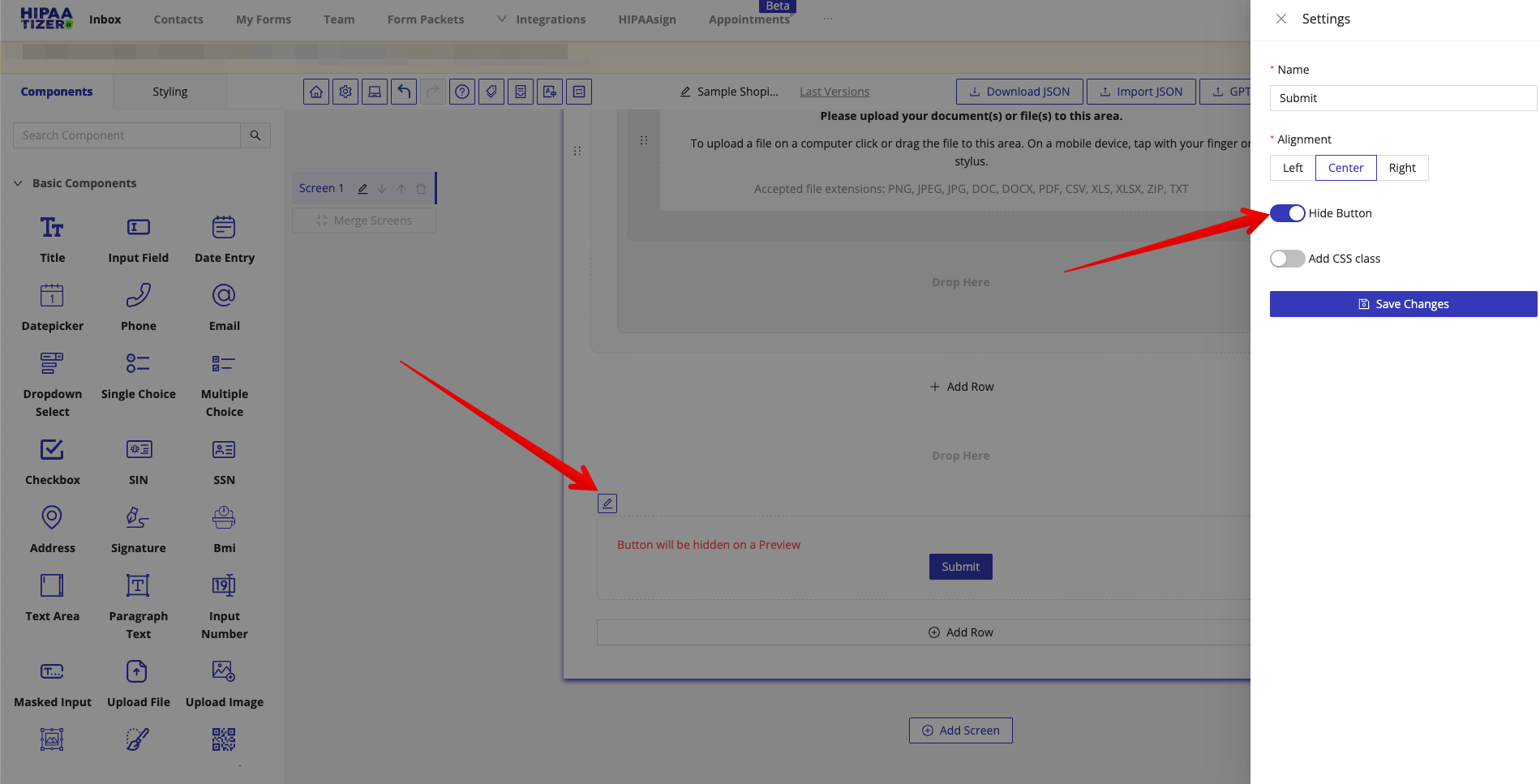
- Click Edit on the Submit button element
- Enable Hide Button
- Click Save
- Publish the form so the changes apply to the live embed
This ensures the form can only be submitted programmatically from Shopify.
Step 2: Open the Shopify theme code editor
- In Shopify Admin, go to Online Store → Themes
- On your active theme, click Edit code
Step 3: Intercept Add to cart and submit the HIPAAtizer form (Dawn theme)
In the Dawn theme, product submission logic lives in product-form.js.
1. Open the product form script
Open:
assets/product-form.js
2. Make the submit handler async
Find the onSubmitHandler(evt) method and make it async:
async onSubmitHandler(evt)
3. Inject the HIPAAtizer submission logic
Inside onSubmitHandler, locate the following guard clause:
if (this.submitButton.getAttribute('aria-disabled') === 'true') return;
Immediately after it, add the code below.
Replace
FORM_IDwith your HIPAAtizer Workflow ID, andFORM_ORIGINwith the form origin from the generated snippet.
const res = await fetch('/cart.js');
const cart = await res.json();
const hipaaURL = cart.attributes?.['HIPAA URL'];

if (!hipaaURL) {
  const FORM_ID = 'xxxxxxxx-xxxx-xxxx-xxxx-xxxxxxxxxxxx';
  const FORM_ORIGIN = 'https://your-forms-domain.example.com';
  const SUBMIT_TIMEOUT_MS = 15000;

  const hipaaFrame = document.getElementById(`${FORM_ID}-iframe`);
  if (!hipaaFrame?.contentWindow) return;

  const requestId = String(Date.now()) + Math.random().toString(16).slice(2);

  const submissionPromise = new Promise((resolve, reject) => {
    const cleanup = () => {
      clearTimeout(timeoutId);
      window.removeEventListener('message', listener);
    };

    const fail = (message, code) => {
      const error = new Error(message);
      error.code = code;
      cleanup();
      reject(error);
    };

    const listener = (event) => {
      if (event.origin !== FORM_ORIGIN) return;
      if (event.source !== hipaaFrame.contentWindow) return;

      const message = event.data || {};

      if (message.kind === 'response' && message.requestId === requestId) {
        if (!message.success || !message.data?.valid) {
          fail(message.data?.message || message.error || 'Form is invalid', 'INVALID');
        }

        return;
      }

      if (message.kind === 'event' && message.type === 'AllFormsSubmitted') {
        const url = message.data?.submissionURL;

        if (!url) {
          fail('The submission completed without a submission URL', 'NO_URL');
          return;
        }

        cleanup();
        resolve(url);
      }
    };

    const timeoutId = setTimeout(
      () => fail('The HIPAAtizer form did not respond', 'TIMEOUT'),
      SUBMIT_TIMEOUT_MS
    );

    window.addEventListener('message', listener);
  });

  hipaaFrame.contentWindow.postMessage({
    kind: 'request',
    requestId,
    command: {type: 'Submit', payload: {}},
  }, FORM_ORIGIN);

  let submissionUrl;

  try {
    submissionUrl = await submissionPromise;
  } catch (error) {
    // An invalid form needs no message here: the form has already shown the
    // customer which fields are missing. The other failures do, because
    // nothing on the page would change otherwise. Replace the alert with
    // your theme's own error UI.
    if (error.code !== 'INVALID') {
      alert('We could not reach the form. Please try again.');
    }

    console.error('[HIPAAtizer]', error);
    return;
  }

  await fetch('/cart/update.js', {
    method: 'POST',
    headers: { 'Content-Type': 'application/json' },
    body: JSON.stringify({
      attributes: {
        'HIPAA URL': submissionUrl,
      },
    }),
  });
}
How this works
- Checks whether a HIPAAtizer submission URL already exists in cart attributes
- If not present:
- Registers the message listener, then sends the
Submitcommand with a uniquerequestId - Reads validity from the command response:
data.validisfalsewhen required fields are missing, and the form shows those errors to the customer - Reads the submission link from the
AllFormsSubmittedevent, which arrives once the submission is stored - Stores the URL in the Shopify cart under
HIPAA URL
- Registers the message listener, then sends the
- Allows the original Shopify submission flow to continue
The response and the event are two separate messages and can arrive in either order, so the listener handles each one independently rather than assuming a sequence. The listener is registered before the command is sent, otherwise a fast reply is missed.
Both sides verify who they are talking to. Your listener checks event.origin and event.source, and the form checks that the command came from its parent page on an allowed origin. Sending to '*' or skipping those checks would expose the exchange to any other frame on the page.
Every failure path rejects with an error.code, so the catch can tell them apart. INVALID is silent because the form has already told the customer what to fix. TIMEOUT and NO_URL are not, because nothing visible happens on the page otherwise and the customer is left clicking a button that appears dead.
The form accepts commands only from the page directly containing it. The theme editor renders your storefront inside another frame, so the page running this code is no longer the form's parent and the command is dropped with no reply.
Preview the product page in its own tab instead. See How the form protects the exchange.
Step 4: Hide the "Buy it now" button
If the Buy it now button is enabled, customers can bypass the Add to cart flow and skip the form entirely.
To prevent this:
- In Shopify Admin, go to Online Store → Themes → Customize
- Open the product template
- Disable dynamic checkout buttons (label may vary by theme)
Notes
- The full command and event reference for this channel is on the postMessage API page
- If you use a theme other than Dawn, apply the same logic in the theme's equivalent product submission handler
- This guide assumes a single-step form. On a multi-step form the
AllFormsSubmittedevent fires only after the last step is submitted, so oneSubmitcommand is not enough to complete the submission HIPAA URLis stored on the cart, not on a line item. Once it is set, the code above skips the form for every later Add to cart, so this flow supports one submission per cart. If a customer can buy two products that each need their own form, store the URL per line item instead- The stored submission link opens the submission in the HIPAAtizer dashboard and requires an authenticated session, so it is not a customer-facing link